
The quick answer
The bitrate in the header can't prove anything. Look at the spectrogram of the busiest part of the track:
- Content up to about 20 kHz with a clean top edge: very likely a genuine 320.
- A flat wall at about 16–17 kHz across the whole track: the source was around 128 kbps.
- A wall at about 18–19 kHz: the source was around 192 kbps.
File size and the bitrate number look exactly the same on a real 320 and a fake one. That's why so many fakes sit in DJ libraries for years without anyone noticing.
What bitrate means for an MP3
Bitrate is how much data the encoder may spend on each second of audio, measured in kilobits per second (kbps). MP3 tops out at 320 kbps. The fewer bits it gets, the more the encoder has to throw away, and the first thing to go is the top of the frequency range: it's the hardest part to hear and the most expensive to store.
So each bitrate tends to leave its own ceiling on the spectrogram:
| Bitrate | Typical cutoff on the spectrogram | Size of a 6-minute track |
|---|---|---|
| 128 kbps | about 16–17 kHz | about 5.8 MB |
| 192 kbps | about 18–19 kHz | about 8.6 MB |
| 256 kbps | about 19–20 kHz | about 11.5 MB |
| 320 kbps | about 20 kHz | about 14.4 MB |
The exact numbers shift with the encoder and its settings, so read them as ranges, not precise lines.
Why a "320" file can really be a 128
Converting an MP3 to a higher bitrate brings nothing back. The encoder takes whatever survived the first compression and spends more bits describing it, including the empty space where the highs used to be. You end up with a 320 kbps header, a 320 kbps file size, and 128 kbps worth of music.
It happens more often than you'd think:
- Download sites and sharing groups convert files so they look premium.
- Audio ripped from videos or streaming platforms has usually been compressed at a lower quality before it's ever saved as an MP3.
- A DJ edit or bootleg gets built from a low-bitrate copy and exported at 320.
- An old file passes through several hands and gets re-encoded along the way.
Every MP3-to-MP3 re-encode also adds a little damage of its own, so a fake 320 can sound slightly worse than the 128 it came from.
Signs on the spectrogram
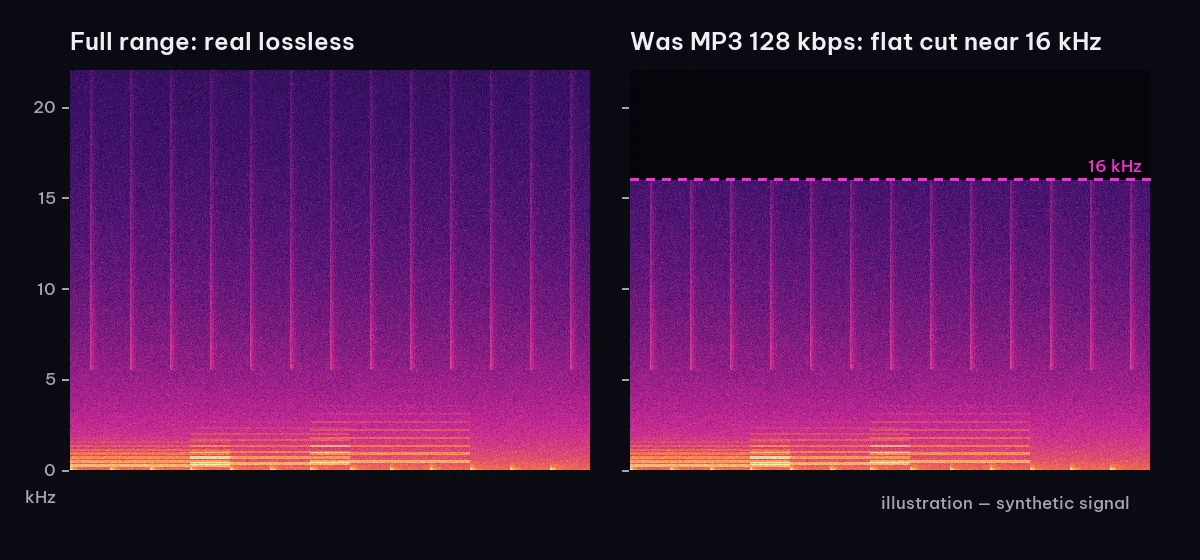
Open the file in any software that shows a spectrogram and jump to the drop or the densest chorus. Intros and breakdowns often have little high end, which proves nothing.
- A flat wall across the whole track. The content stops at the same height from start to finish, as if cut with a ruler. That height is the fingerprint of the original bitrate; compare it with the table above.
- Patchy highs above about 16 kHz. Low bitrates often leave the top band spotty: bits of content flicker on and off instead of forming a continuous layer.
- A sharp edge instead of a gentle fade. A natural master rolls off gradually as you go higher. An encoder cutoff is abrupt, going from bright to black within a few hundred hertz.
- Everything else looks normal. Bass, mids, and loudness are untouched, which is exactly why your ears miss it.
More on reading the image in how to read a spectrogram.
Can you hear the difference?
Sometimes. With good headphones and a copy you know is genuine to compare against, you can often hear a 128 source in the hi-hats and cymbals: they sound swishy or watery, and reverb tails turn grainy and slightly metallic. Wide stereo pads can sound smeared.
Ear tests have limits, though. Many adults don't hear much above 16 kHz anyway, so you're listening for side effects, not for the missing band itself. Tired ears, a noisy room, and small speakers hide the rest. On a big club system the dull top end does come through, usually in the middle of your set. Use your ears to confirm and the spectrogram to decide.
CBR and VBR in two minutes
- CBR (constant bitrate) spends the same number of bits every second. A "320 CBR" file is 320 kbps from the first second to the last.
- VBR (variable bitrate) spends more bits on complex passages and fewer on simple ones. The file info shows an average, which at the highest quality setting usually lands somewhere around 220–260 kbps.
A VBR file showing 245 kbps is not a bad file; at top settings it's typically on par with 320 CBR. Neither mode says anything about the source, either: a VBR file made from a 128 kbps MP3 is just as fake. The check is the same for both: find the cutoff.
Not every file records CBR or VBR in its header, so your software may not show it at all.
FAQ
Is a 320 kbps MP3 good enough for club play?
A genuine one, yes. On a big system very few people can tell a well-encoded 320 from a lossless original. The real risk is fake 320s, not the format itself. For the format choice, see MP3 320 vs FLAC vs WAV for DJs.
Does a bigger file mean better quality?
No. An MP3's size comes from its bitrate setting and its length. A 6-minute 320 kbps MP3 weighs about 14 MB whether it came from a studio master or from a 128 kbps rip.
Can I fix a fake 320?
No. The lost highs are gone, and re-encoding again only adds more damage. Look for a better source, such as the store or label you bought it from, and keep the fake out of your main crates until you find one.
Is checking a FLAC any different?
The method is the same: find the cutoff on the spectrogram. The difference is that a lossless file should reach close to the top of its range. See how to spot a fake FLAC.
Faster with Taxonomy DJ
The audio quality checks in Taxonomy DJ measure the cutoff for you:
- Drag MP3s onto the Inspector tab, or click Choose files. A whole batch works, and nothing is added to your library.
- Select a file. The Quality check lists its frequency cutoff and an estimate of the original quality: about 128 kbps, about 192 kbps, about 320 kbps, or lossless.
- A file that claims 320 kbps but cuts off clearly too low gets a red Upscaled line. Files in between still show the cutoff and the estimated original, so you can judge for yourself.
- The full-track spectrogram sits right below. Click the zoom button to look closely above 15 kHz.
- The Audio card shows the encoding, plus the bitrate mode (CBR or VBR) when the file's header records it.
It's free on every plan. In the Music Library tab, the Kbps column shows the declared bitrate of every track, so you can see what you're working with before you start inspecting.
Read next: how to detect a fake 24-bit WAV and sample rate and bit depth for DJs.