
The short answer: start flat, fix one thing at a time
Most "best EQ" screenshots online are a smile curve with every slider maxed out. That sounds exciting for ten seconds and tiring after ten minutes. Settings that actually hold up follow a few rules:
- Start flat. Listen to a track you know well and name one problem: too boomy, too harsh, vocals buried.
- Cut before you boost. If it sounds muddy, cutting a little around 250 to 400 Hz usually works better than boosting the treble to "brighten" it.
- Keep moves small. About 3 dB is a clear change, 6 dB is a lot. Past that you're usually fighting the speaker or the recording.
- Lower the overall level by about what you boost. Boost bass by 6 dB, pull the preamp down by around 6 dB too. More on why below.
- Compare at the same volume. Louder always sounds "better" at first. Toggle the EQ off and on, and judge only once the levels match.
If you're new to frequencies and EQ types, read EQ basics first. This post is the cookbook.
Find the problem before you turn a knob
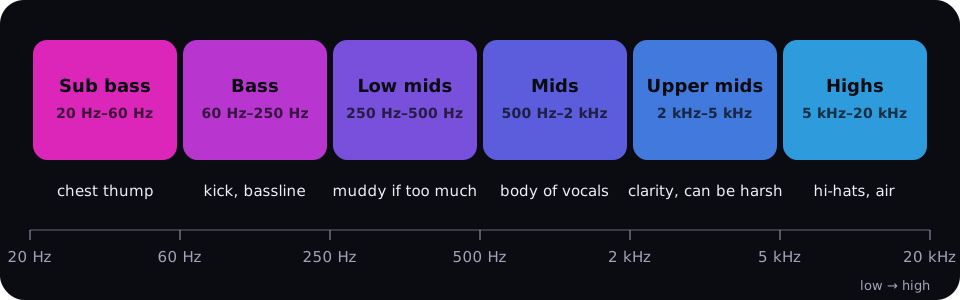
Describe what you hear, then go to the frequency range that causes it:
| It sounds… | Where it usually lives | Try |
|---|---|---|
| Boomy, one bass note rings | 80–200 Hz | A narrow cut of 3 dB at the ringing note |
| Muddy, cloudy | 200–400 Hz | A wide cut of 2–3 dB |
| Boxy, like a cardboard tube | 400–800 Hz | A cut of 2 dB |
| Harsh, tiring | 2–4 kHz | A cut of 1.5–3 dB |
| Sharp "s" sounds | 5–8 kHz | A narrow cut of 2–3 dB |
| Thin, no weight | Around 80–120 Hz | A gentle shelf boost of 2–4 dB |
| Dull, no air | Above 8–10 kHz | A shelf boost of 2–3 dB |
A narrow cut (high Q) removes one problem without touching its neighbors. Boosts sound more natural when they're wide (low Q) or a shelf.
Best EQ settings for bass
More bass is the most common request, and the easiest one to overdo.
- Low shelf at about 80–100 Hz, +3 to +6 dB. A shelf lifts the whole low end evenly instead of piling up one bump.
- Cut 1.5–2 dB around 300 Hz. Extra bass spills into the low mids and turns muddy. Making room there keeps it punchy.
- Lower the preamp by about 3 dB or more, depending on how far you boosted.
- On small speakers, don't chase sub bass. A laptop or a small wireless speaker can't play below roughly 100–150 Hz. Boosting there only makes the cone distort. Lift around 150–250 Hz instead, where they can still play.
Want weight you feel in your chest on a proper system? That lives at 40–60 Hz. Want kick punch? That's more like 80–120 Hz. Separate the two and you get a tight bass instead of a boomy one.
Best EQ settings for vocals
Voices sit roughly between 200 Hz and 4 kHz, and clarity is decided around 2 to 3 kHz.
- High-pass around 80–90 Hz. A voice has almost nothing down there, so cutting it clears space without changing the singer.
- Cut about 3 dB around 250 Hz, the muddiest part of the voice.
- Boost 3–4 dB around 2.5 kHz for intelligibility.
- Add about 2 dB around 5 kHz for presence, then listen for sharp "s" sounds. If they jump out, ease off or cut a little at 6–8 kHz.
For podcasts and spoken word, the same idea works with a slightly stronger high-pass and a bit more air on top.
EQ settings by goal
The numbers are starting points, not laws. Every speaker and every pair of headphones is a little different.
| Goal | Cut | Boost | Preset in Taxonomy DJ |
|---|---|---|---|
| More bass | About 300 Hz, −1.5 dB | Low shelf 80 Hz, +6 dB | Bass Boost |
| Clearer vocals | Below 90 Hz, 250 Hz −3 dB | 2.5 kHz +4 dB, 5 kHz +2 dB | Vocal Boost |
| Headphones | Harsh peaks only, if you hear them | Low shelf around 105 Hz, +4 dB | Headphones (Space) |
| Laptop or small speakers | Below about 130 Hz, 3 kHz −1.5 dB | 220 Hz +3 dB, highs +2.5 dB | Laptop speakers (Space) |
| The car | 150 Hz −3.5 dB | 2.5 kHz +2.5 dB, highs +3.5 dB | Car (Space) |
| Listening quietly at night | 1 kHz −1.5 dB | Lows +6 dB, highs +4 dB | Loudness |
| Late at night, thin walls | Everything below 90 Hz, 200 Hz −2 dB | 2 kHz +1.5 dB | Late night |
Headphones
Headphones vary more than any other gear: many open and budget models lack low bass, while some closed models already push it hard. Start with a gentle low shelf around 100 Hz and only cut the upper mids if they actually tire you. Crossfeed, which blends a little of each channel into the other ear, takes away the "music inside my head" feeling on long sessions.
Laptop and small speakers
Accept that there's no sub. Cut the deep bass the speaker can't play, give it a little body around 200 Hz, and take the edge off 3 kHz, where small drivers tend to sound harsh.
The car
A closed cabin boosts the lowest bass by itself, often by several dB, so boosting sub in a car usually ends in boom. The real problems are a buildup around 100–200 Hz and highs swallowed by seats and carpet. Cut the first, lift the second.
Late at night
Two different needs share this one. At low volume your ears lose bass and treble, so music sounds thin: a loudness curve brings both back. If the worry is the neighbors, do the opposite: cut the sub bass, which travels through walls, and leave the rest alone.
Boosting too much: distortion and clipping
Every boost adds level. Most modern tracks are mastered right up to the digital ceiling, so a 6 dB bass boost has nowhere to go. The peaks get flattened, which is clipping, and you hear it as crackle on the kicks or a flat, tiring loudness.
Speakers have a ceiling too. A small speaker pushed with a big bass boost distorts long before the volume knob says it should.
The fix is boring and works every time: lower the preamp or the overall level by about as much as you boosted, and prefer cuts to boosts. A limiter can catch what slips through, but if it's working constantly, it's squashing your music. Turn the preamp down.
FAQ
What is the best EQ setting for bass?
A low shelf around 80–100 Hz boosted by 3 to 6 dB, a small cut of about 1.5 dB around 300 Hz to keep it clean, and the preamp lowered by about 3 dB. On small speakers, lift 150–250 Hz instead of the deep sub they can't play.
Is a V-shaped EQ a good idea?
It's fine for short, loud sessions like a party or the gym, because boosted lows and highs sound lively. For long listening it gets tiring and pushes vocals back. Keep the V shallow, a few dB at each end, and lower the overall level to match.
Can EQ fix a low-quality MP3?
Only a little. EQ can tame harshness or add warmth, but it can't bring back detail that was thrown away when the file was encoded. Boosting the highs on a low-bitrate file often makes its artifacts more obvious.
Should I use presets or set the EQ by hand?
Start with a preset that matches your goal, then adjust by ear. A good preset gets you most of the way, already balances its boosts with a lower preamp, and saves you from guessing frequencies.
Faster with Taxonomy DJ
The Taxonomy DJ player and EQ has every recipe above built in, free on every plan:
- Click EQ to open the EQ window. The 34 presets are grouped into By mood, Quick tweaks, and Genre sounds. Quick tweaks holds the cookbook: Bass Boost, Bass Cut, Treble Boost, Treble Cut, Vocal Boost, Loudness, and Spoken word. Late night under By mood cuts the sub. Step through presets with ‹ ›.
- In the Space section at the bottom, pick where you're listening from 13 presets, including Headphones, Headphones · relaxed, Laptop speakers, Party speaker / PA, Club rig / Subwoofer, Car, and Small room. Space has its own switch and stays put when you change the EQ preset.
- Fine-tune by dragging the dots on the graph, or switch to 10 sliders from 31 Hz to 16 kHz. The boost presets already lower Preamp to leave room. If a small limiter badge keeps flickering, pull Preamp down a little more.
- Flip the EQ switch Off and On to compare, then save the result as your own preset.
Read next: EQ basics: how to make music sound better and a music player with a real EQ.